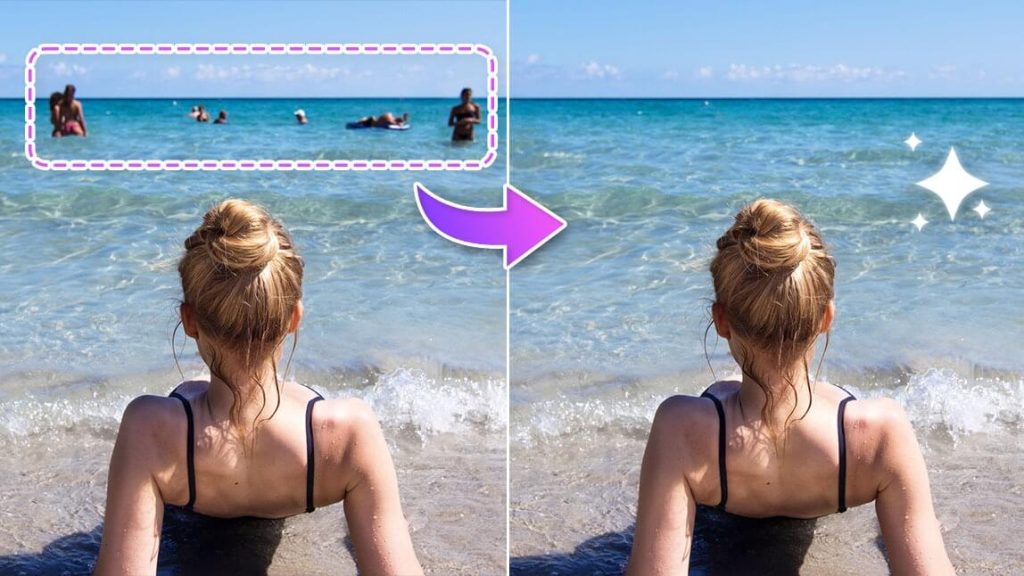
In an increasingly visual world, photography has become a universal language. With the popularization of social media, the demand for perfect images has grown exponentially. However, it's not always possible to control every element of a photo, especially when it comes to unwanted people in the background. Fortunately, technology has brought us innovative solutions: apps capable of efficiently and accurately removing people from photo backgrounds.
With the evolution of artificial intelligence algorithms, these apps have become essential tools for amateur and professional photographers. They allow not only the removal of people, but also background manipulation, color adjustments, and a range of other edits, transforming an ordinary photo into a work of art. But with so many options available, how do you choose the right app for your needs? This article presents the top 5 most efficient apps for removing people from the background of your photos.
The Evolution of Photo Editing
Photo editing has gone from being a skill exclusive to professionals to an everyday activity for many. Photo editing apps are constantly evolving, offering increasingly advanced features and user-friendly interfaces. The ability to remove people from a photo not only improves the image's aesthetics but also preserves the privacy and authenticity of the captured moment.
1. TouchRetouch
TouchRetouch is an extremely popular app among photography enthusiasts. With an intuitive interface, it allows users to remove people, objects, and even imperfections from photos with just a few taps. The app's intelligent algorithm fills in the empty space naturally, maintaining background consistency. Furthermore, TouchRetouch offers tools for cloning areas, which is perfect for detailed adjustments.
The great advantage of TouchRetouch lies in its simplicity. With interactive tutorials, the user can quickly adapt to the application's functionalities. TouchRetouch's versatility makes it suitable for both quick edits and more complex adjustments, always with surprising results.
2. Adobe Photoshop Fix
Known for its excellence in image editing software, Adobe also offers a robust solution for mobile devices: Adobe Photoshop Fix. This application provides precise control over removing elements from photos, including people. The "Content-Aware Fill" functionality is particularly noteworthy, as it allows the user to remove objects and fill the space left behind intelligently and almost imperceptibly.
Adobe Photoshop Fix also stands out for its integration with other Adobe applications, allowing for more detailed editing in Photoshop CC, for example. Although it has a slightly steeper learning curve, its advanced features compensate for the time invested.
3. Snapseed
Developed by Google, Snapseed is one of the most complete photo editing apps available for free. The "Healing" tool allows users to effectively remove unwanted people or objects from photos. In addition, Snapseed offers a wide range of filters and adjustment tools, making it a versatile option for different types of edits.
What truly sets Snapseed apart is its intuitive interface combined with powerful features. Its algorithm for filling in the gaps after object removal is highly efficient, ensuring that edits look natural and harmonious.
4. Pixelmator
Pixelmator is known for being a powerful application that approaches the functionality of desktop software. Its "Repair" tool is incredibly effective at removing people and objects from photos, intelligently replacing them and integrating them into the image's environment. In addition to removal tools, Pixelmator offers a wide range of editing options, such as layers, filters, and effects.
Pixelmator's versatility makes it an excellent choice for those looking not only to remove elements from photos, but also to perform complex and creative edits.
5. Remove.bg
Unlike the other apps mentioned, Remove.bg specializes in removing image backgrounds. With just a few clicks, users can remove people and objects from the background, replacing them with a solid background or an image of their choice. The accuracy and quality of the background removal are impressive, making Remove.bg a valuable tool for anyone working in graphic design, marketing, or who simply wants to add a special touch to their photos.
Despite its specialization in background removal, Remove.bg is extremely easy to use, offering professional results even for users with no photo editing experience.
Features and Possibilities
In addition to the ability to remove people and objects, the listed apps offer a variety of other functionalities. Color adjustments, adding filters, texture manipulation, and layer control are just some of the available options. These tools allow you to completely transform a photo, from subtle corrections to drastic and creative changes.
FAQ
Q: Are the listed apps free? A: Some apps, like Snapseed, are completely free. Others may offer free versions with limited features or subscription models.
Q: Do I need experience in photo editing to use these apps? A: No. These apps were developed with users of all skill levels in mind. Many of them offer interactive tutorials and intuitive interfaces to make them easy to use.
Q: Can apps remove any person or object from a photo? A: Although the algorithms are quite advanced, the result may vary depending on the context of the photo, the complexity of the background, and the image quality.
Q: Do the apps also work on tablets or only on smartphones? A: Most apps are available for both smartphones and tablets, offering the same range of features on both devices.
Conclusion
Apps for removing people from photo backgrounds have transformed image editing into an accessible and fun activity. Whether you're a professional photographer looking to perfect your images or someone who wants to enhance their family photos, there's an app on this list that can meet your needs. With intuitive interfaces and powerful algorithms, these apps open up a world of possibilities for your photos, allowing you to express your creativity and preserve your moments in the most beautiful way possible.